RayXpert licences are made available on an annual or multi-annual basis, depending on your contract. We do not offer perpetual licences.
Yes, RayXpert can be installed on several PCs and you can share the dongle. However, the dongle must remain plugged in until the end of a calculation on your machine. 1 licence = 1 simultaneous computer.
Yes, there are 3 different types of package for RayXpert: SILVER: for Gamma & Beta radiation; GOLD: for Gamma, Beta & Neutron radiation; PLATINUM: for Gamma, Beta, Neutron & Hadron radiation. You have the option of adding the pro version, which is compatible with each of the licenses and gives you access to a server license in addition to the user license.
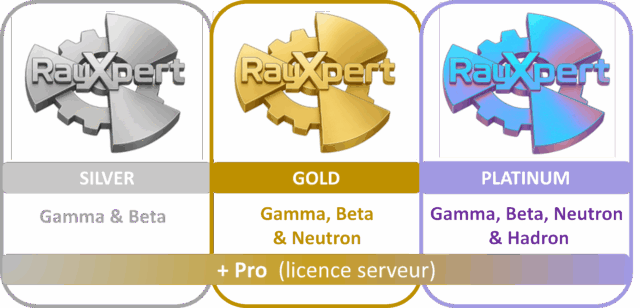
The server licence (Pro) allows you to install the software on a calculation server or calculation cluster on which all users can send calculation requests via their user interface. The server’s operating system will be supplied to TRAD so that it can deliver an executable file in the exact same version of your operating system, under LINUS or Windows.
Training courses are organised at the request of the user(s) and solely for your company (no group training). A nuclear physics engineer will offer you training slots. 3 session of 2 hours by video sessions, or a full day in person. You will be asked to view all the videos available on your resource space before the course, and to send us a list of questions.
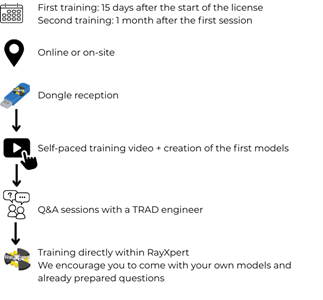
One day face-to-face or can be done by videoconference in 3 sessions of 2 hours.
No, but it is compulsory to access the support service. It is therefore strongly recommended.
The management of physical processes for particle-matter interactions was programmed on the basis of the GEANT4 physics treatment, but reworked by TRAD Tests & Radiations and included in the code.
RayXpert is capable of managing the interactions of the following particles:
o Gamma rays: photons and X-rays
o Beta rays: electrons and positrons
o Neutron rays: neutrons
o Hadron rays: protons, ions, alphas, tritons, deutons
In RayXpert, there are several different databases:
– DECAY : EAF 2010 / JEFF 3.1.1/ JEFF 3.3 dec / ENDFB VIII.0 dec /
– NEUTRONS: ENDFB VIII.0 n / ENDFB VII.1/ ENDFB VII.1 therm / TENDL 2024 / JEFF3.3 n.
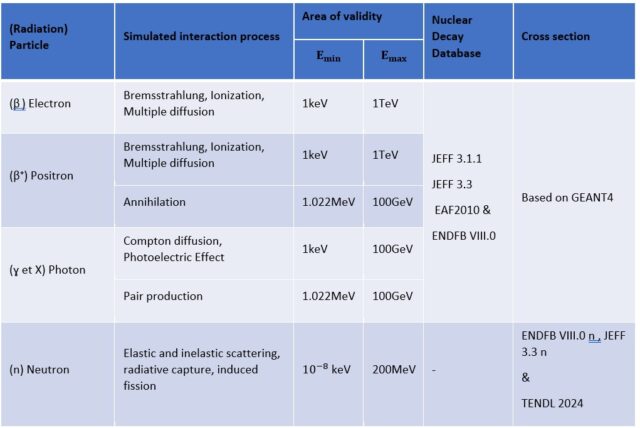
Table summarising the radiation included in RayXpert, the simulated interactions, the areas of validity per radiation, and the databases available in RayXpert.
RayXpert is designed for applications such as radiation protection, sterilisation and radiation processing. However, if you need calculation software for space applications, there is Fastrad, also developed by TRAD.
More information on www.trad.fr
Depending on the particle being simulated, RayXpert will sample the emission probabilities governed by the physical models or effective cross sections at the end of the step and emit the secondary particle(s). The energy and angular distributions of the secondary particles are also governed by these physical models and effective cross-sections.
Not yet, but they will be in version 2.1. For the moment, it is necessary to determine the spectrum of the secondary neutrons emitted and enter it into RayXpert.
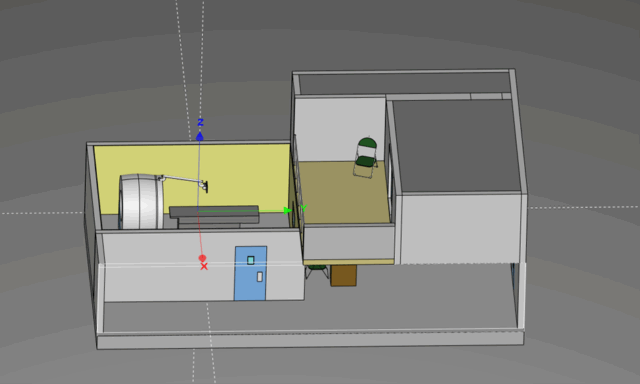
Yes, this is possible via a file in STEP format, AP214, AP214_IS or AP209 protocol. This format has been selected because it can be generated by all CAD systems: Catia, AutoCAD, Solidworks, FreeCAD, etc. It is also possible to model directly in RayXpert in addition to the imported model.
RayXpert has several different databases: EAF 2010 / JEFF 3.1.1/ JEFF 3.3 dec / ENDFB VIII.0 dec / ENDFB VIII.0 n / ENDFB VII.1/ ENDFB VII.1 therm / TENDL 2024 / JEFF3.3 n.
Yes, it is also possible to create a model directly in RayXpert using simple or advanced modelling functions.
Yes, in order to carry out a calculation that is representative of your problem, you need to assign the right materials to the right elements. By default, the elements are in air in RayXpert. To assign materials, you can either use the reference materials database available from Nist, or configure your own materials. To define your materials, you need to know their chemical composition and associated mass or atomic fractions, as well as their density.
Yes, it is possible to create your own materials in RayXpert, using the materials manager integrated directly into the software.
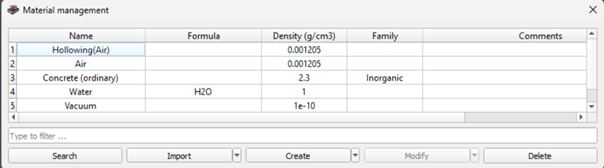
The materials will have to be defined for each new import. You can use the AP214_IS STEP import protocol, which allows you to import the name of the materials associated with each shape in the 3D model. RayXpert can directly associate the right material if it exists in its included database. In this case, the names of the materials in the model and those in RayXpert must be identical. Otherwise, it is possible to make a mass selection of elements in the 3D model by pressing Ctrl + F, which will associate a material with a set of elements. Finally, we have developed a script to read an Excel file describing the names of shapes and materials, and to automate the assignment of materials via the script. This is available on request.
These are invalid shapes detected in the model. There are several ways of resolving these invalid shapes:
– Play with the resolution of the imported model: you can set the resolution at the time of import, or directly on the imported shape.
– Run the shape repair algorithm.
– Isolate these shapes and rework them in the CAD tool used, then re-import the model.
An overlap occurs when two shapes occupy a common portion of space and their geometries intermingle. Overlaps must be resolved before starting a calculation, as this would be a source of error and would disrupt the transport of particles in overlapping areas. To correct these overlaps, you can either perform transformations so that there are no more zones of intersection between the elements or you can remove material from the selected elements. To do this, RayXpert has an overlap resolution algorithm that allows you to remove material.
Yes, it is possible to export a STEP from RayXpert, as RayXpert allows you to correct and clean up your original STEP by automatically detecting overlaps and repairing invalid shapes.
It is possible to parameterise decay sources using radionuclides. The various decay databases available in RayXpert can be used to define the lines emitted by your radionuclides and their associated intensities.
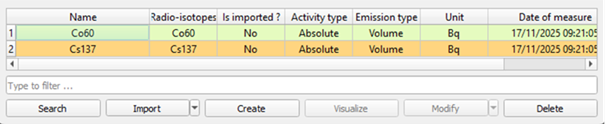
Yes, the histogram type energy distribution allows you to enter a text file describing the energy spectrum of your source. There are also other energy distributions (mono-energy, beta, Gaussian, Maxwell, etc.).
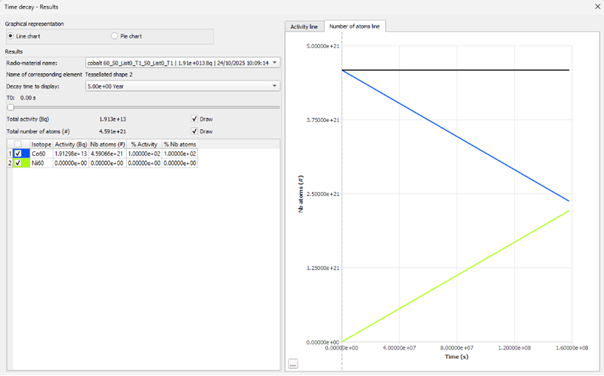
Yes, this functionality is available via a specific module with this name. If you do not use this module, decay is not taken into account. If you choose to use this module, the user must define the time steps at which the activities of the radionuclides defined will be calculated. A window will allow you to view the evolution of the radionuclides according to the defined time steps.
Yes, of course, it is possible to display the trajectories of randomly generated particles before a calculation is launched. It is also possible to display the trajectories of each particle following a calculation. But don’t worry, you can’t see anything beyond a certain number of drawn particles.
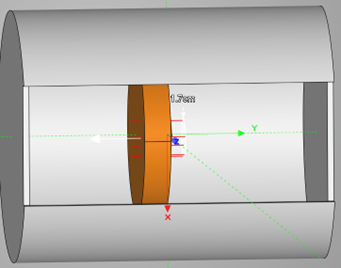
Via the interface, or via the results files generated in text format.
A sensitive volume is an element of the 3D geometry that is selected by the user and in which the chosen physical quantity is calculated. A 3D map is a virtual mesh superimposed on the 3D model, the resolution of which can be parameterised, and which will ultimately enable the spatial evolution of the calculated quantity to be displayed according to a colorimetric scale. By default, only the French zoning is available. However, you can define your own zoning.
Yes, the application of a radiological zoning is a way of viewing the results available in RayXpert. It is entirely possible to apply the zoning of a desired country, save it and reuse this display mode for other simulations.
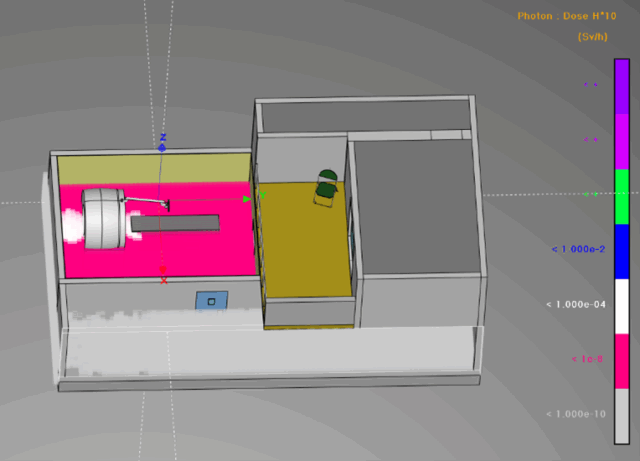
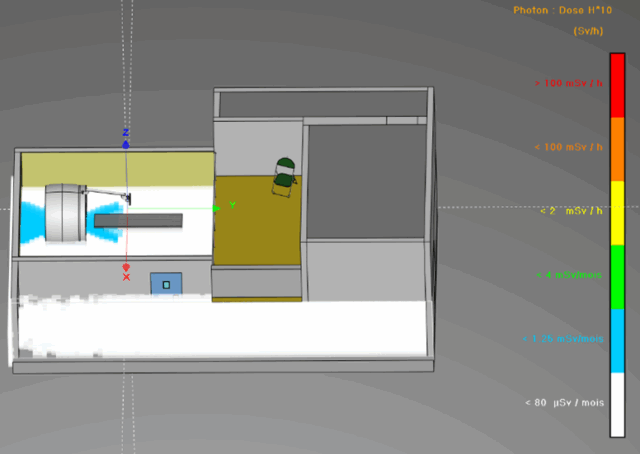
This function is available in RayXpert, and allows you to calculate the dose received by an operator on his route, along different segments of the route, and in total. This feature allows you to reduce operator exposure time by selecting the most optimal route. Ideal for setting up an ALARA approach.
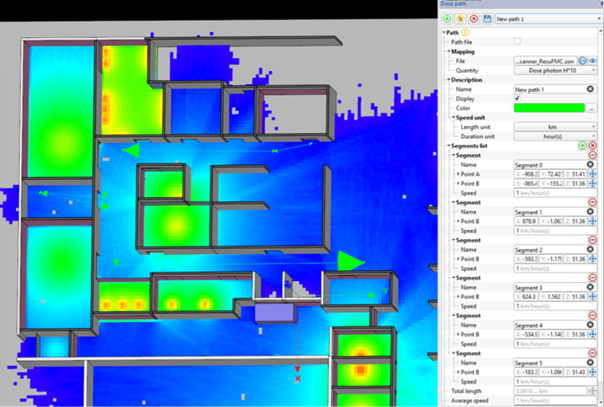
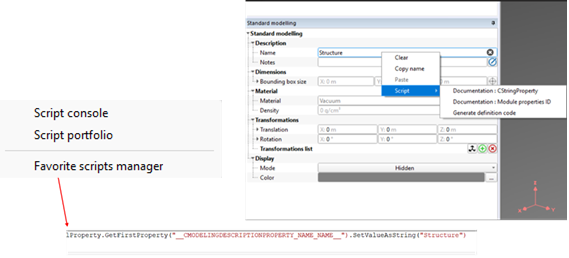
Yes, of course you can. All you have to do is open the script console as follows:
This is the statistical error (or uncertainty) associated with a Monte Carlo calculation. A low sigma corresponds to a precise result, while a high sigma means that the result is still unclear (not enough particles have been fired yet).
A dosimetric coefficient is a factor used to convert fluence (number of particles per unit area) into an effective or equivalent dose received by an organ or the whole body. This makes it possible to determine the dose received from the quantity of incident radiation, taking into account the physical and biological properties of the radiation and the material through which it passes. The dosimetric coefficients included in RayXpert are as follows: Photons (gamma, X), Electrons and Neutrons (optional module)
The operational quantities are calculated on the basis of flux. The particle flux is calculated in the detector and then flux/dose conversion coefficients, depending on the quantity chosen, are applied to it. These coefficients are used to assess the biological damage caused by the radiation involved.
The most commonly used quantity is H*10, which represents the ambient dose equivalent rate in Sievert/hour.
If you wish, you can create your own calculated quantity and import it into RayXpert in the form of a text file describing the conversion coefficients to be applied.
Yes, RayXpert lets you duplicate a model (geometry + sources + materials) and modify it to create an alternative scenario. The results (dose rates, flux, energy deposits) can then be compared directly in the software output or exported to Excel/CSV for graphical analysis.
RayXpert a été un excellent outil pour accélérer notre cycle de développement. Nous sommes maintenant en mesure de concevoir un blindage efficace sans passer par la réalisation de nombreux prototypes en plomb très coûteux. Il s’adapte à notre géométrie complexe et offre une méthode pour optimiser la conception afin de réduire le poids total de notre système.

L’interface graphique conviviale de ce logiciel, y compris la possibilité d’importer des géométries complexes de CAO et l’introduction de sources multiples radioactives, permet de résoudre facilement et avec une précision élevée des problèmes complexes dans différents domaines nucléaires, tels que la définition des débits de dose pour la qualification des équipements d’Instrumentation et de Contrôle, les calculs de blindage et la caractérisation des déchets radioactifs

En tant que spécialistes des procédés d’irradiation industriels (Gamma, Faisceau d’électrons et Rayons X de faible, moyenne et forte énergie) nous mettons en œuvre RayXpert non seulement pour des calculs de radioprotection mais aussi et surtout pour des simulations de dépôt de dose dans des produits irradiés dans leur configuration géométrique réelle, notamment en important des fichiers de modélisation 3D dérivés d’Autocad. De plus, pour les personnes, qui comme moi n’ont jamais utilisé d’outils tels que Geant 4, EGS ou MCNP, RayXpert est un outil fantastique. Pas besoin d’être informaticien pour sortir le meilleur de ce logiciel il suffit d’être physicien pour bien comprendre les phénomènes et la physique sous-jacente.

As specialists in industrial irradiation processes (gamma, electron beam and low, medium and high energy X-rays) we implement RayXpert not only for radioprotection calculations but also and especially for deposit dose simulations on irradiated products with their real geometrical configuration, notably by importing 3D modeling files derived from Autocad. In addition, for people who like me have never used tools such as Geant 4, EGS or MCNP, RayXpert is a fantastic tool. No need to be a computer scientist to get the best out of this software just to be a physicist to understand the phenomena and the underlying physics

The user-friendly graphical interface of this software, including the possibility to import complex CAD geometries and to introduce radioactive multi-sources, enables to easily solve, with a high precision, complex problems in different nuclear fields such as the dose rates definition for the qualification of Instrumentation and Control equipment, the shielding calculations and the radioactive waste characterisation

RayXpert has been an excellent tool to speed up our development cycle. We are now able to design effective shielding without numerous expensive lead prototypes. It accommodates our complex geometry, and provides a precise method to optimize the design, in order to reduce the weight and cost of our system.

We use RayXpert for calculation of the shielding of a transport container for our 60Co sources. We plan to use it in the future for other similar projects. It is in principle easy to use tool after few training sessions with TRAD. RayXpert imports CAD files of the objects for simulation of 3D dose distribution. We can also add multiple detectors at the desired locations around the object for more precise dose calculation, including indication of the precision. RayXpert has also a nice feature to continue simulations from the previously saved data, which helps to improve the accuracy of the results.

We use RayXpert for calculation of the shielding of a transport container for our 60Co sources. We plan to use it in the future for other similar projects. It is in principle easy to use tool after few training sessions with TRAD. RayXpert imports CAD files of the objects for simulation of 3D dose distribution. We can also add multiple detectors at the desired locations around the object for more precise dose calculation, including indication of the precision. RayXpert has also a nice feature to continue simulations from the previously saved data, which helps to improve the accuracy of the results.
 RayXpert